Governed AI workspace for operational work
Your tools hold the records. Bring the context together. Decide the next step.
SpineWorkspace brings authorized records, messages, documents, and recent decisions into one workspace. People and AI work from the same evidence, review proposals, and approve changes to the systems that own the record.
SpineWorkspace does not replace your systems of record.

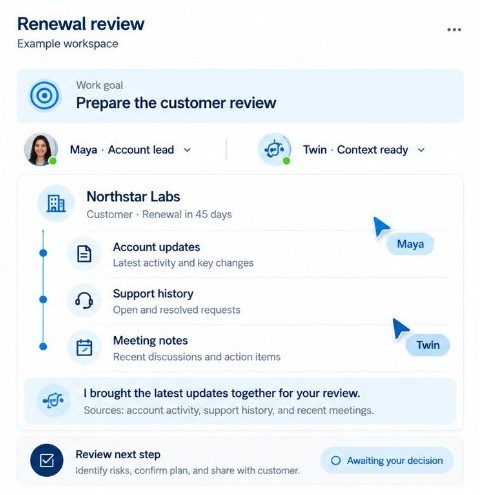
Example workspace · demonstration
Northstar Labs renewal
Awaiting review · not completed
Goal
Prepare the renewal decision
Truth
Renewal date and contract
Account owner, open ticket state
Context
Latest commitment
Usage change, escalation notes
Evidence
Contract, ticket, email
Proposal
Renewal follow-up task
Execution
Not started
Approval is still required
- YouTwin
The work
A renewal is already split across the tools.
Northstar Labs has a renewal date, contract terms, an account owner, and an open ticket. The latest commitment, a usage change, and the escalation notes live somewhere else. Someone has to rebuild that before anyone can decide.
Records the tools already hold
- Renewal date
- Contract terms
- Account owner
- Open ticket state
Assembled for this decision
- Latest commitment
- Usage change
- Escalation notes
How the work is held
Truth, context, proposal, decision
Authority comes from the record and its governance—not whether the information lives in a database, document, or message.
Truth
Authoritative facts and state, with their source, scope, and verification status.
Context
The relevant records, evidence, commitments, signals, and prior decisions assembled for this task.
Proposal
An AI-prepared interpretation or next step, linked to evidence and awaiting the required review.
Decision
An authorized person’s acceptance, modification, or rejection of a proposal.
One workflow, end to end
Prepare the Northstar Labs renewal decision
Evidence, a specific proposed action, a person’s edit, then the result in the CRM. Approval and completion stay separate.
Illustrative workflow
Renewal readiness for Northstar Labs
Demonstration, not a customer result
- 01 · AssembleRenewal date, contract terms, account owner, and open ticket state sit with the latest commitment, the usage change, and the escalation notes.
- 02 · IdentifyThe renewal risk is named. Each point links back to its source.
- 03 · ProposeTwin prepares one action: create a renewal follow-up task in the connected CRM, for the account owner.
- 04 · ReviewThe account owner inspects the evidence, edits the follow-up, and approves it. Approved is not completed.
- 05 · ExecuteThe approved action is sent to the CRM that owns the record. The workspace then shows success, failure, or still pending.
- 06 · ContinueThe decision and the execution result stay with the work, so the team can resume without rebuilding the account.
Spine InnovLabs
The products
SpineWorkspace, Spine Platform, Spine Fabric, Spine Twin, Spine Coworker, Spine Context Assembler, Spine Adaptive Auto Tuner, Spine Triage Bot, and Spine Folder Monitor.
SpineWorkspace
The workspace where a person sees the work and decides.
Learn more →Spine Platform
The platform the Spine products run with.
Learn more →Spine Fabric
One connection to the tools that keep the record.
Learn more →Spine Twin
Prepares a proposal when someone asks. A person decides.
Learn more →Spine Coworker
Gathers the records and evidence this person may use.
Learn more →Spine Context Assembler
Assembles the context for this task. The tools keep the record.
Learn more →Spine Adaptive Auto Tuner
Fits the workspace to the role and the task.
Learn more →Spine Triage Bot
Sorts what just arrived so a person sees what needs a decision.
Learn more →Spine Folder Monitor
Watches the folders the business already uses. The file stays in the folder.
Learn more →
In the workspace
A proposal you can inspect
Approval is required. Execution has not started. Those are different states, and the workspace shows both.
See governance- Proposed action
- Create a renewal follow-up task
- Destination
- Connected CRM
- Owner
- Account owner
- Evidence
- Contract, support ticket, latest customer email
- Approval
- Required
- Execution
- Not started
Connectors
These names are in the catalog. A published status — available, beta, or planned — is not attached to each one.
 Salesforce
 HubSpot
 Stripe
 Slack
Slack Jira
Jira Zendesk
 Gmail
Gmail Notion
 Shopify
 GitHub
 Asana
Asana Intercom
 QuickBooks
 Google Drive
 Microsoft Teams
 Linear
India and UAE connectors are the ones marked coming soon. See the catalog
Start with Account Success
Renewal readiness is the first workflow to evaluate. Other solution paths use the same model.
- Account Success
Carry the customer record and the context for each interaction.
Bring the customer story into every next step.
- Finance & Business Ops
Revenue, risk, and operations from the same truth and context.
- Sales
Keep revenue work connected.
- Marketing
Campaigns connected to business outcomes.
- Content
Content work with the brief's context.
- Customer Support
Support with the full customer story.
Illustrative proof · demonstration, not customer results
What the product is built to do
Demonstrations show how the product operates. They are not claims of customer outcomes.
Demonstration
The tools you already use
Each tool stays itself. SpineWorkspace shares the record and the evidence for the work. The tools do not have to talk to each other directly.
Demonstration
What is actually connected
SpineWorkspace sees which tools are available and working. It does not assume a connection that is not there.
Demonstration
Use what is already there
The work uses the tools already open for that person before it reaches for anything else.
Evaluation
Start with one governed workflow.
Pricing follows scope and integration needs. Proof shows product behavior — not invented customer results.
See SpineWorkspace on your work.
Start with the Northstar Labs renewal: the records, the proposal, the decision, and the result in the CRM.